A Model 3’s Dark Display Is Different From Its Screen Clean Mode
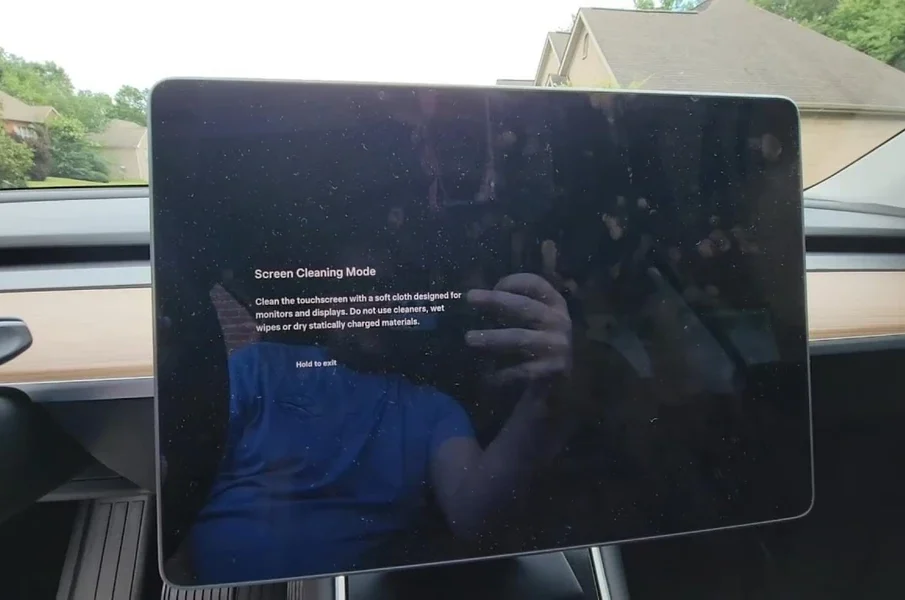
When including a Tesla Model 3 touchscreen in an interior clean, discuss the supported cleaning state rather than simply asking for the screen to look switched off. Tesla says owners can enable Screen Clean Mode to wipe the display without activating buttons or changing settings. That temporary function and a dark appearance are different things. Follow the instructions applicable to the actual car.
The surface being wiped is also a control
A fingerprint can be in exactly the place where an owner normally changes a setting. That is what makes this small cleaning task different from wiping the adjacent trim. The display is a surface the detailer sees, but it is also an interface the driver uses. A request to remove visible marks should account for both roles instead of treating the screen as another decorative panel.
The distinction is easy to miss when the car is parked and quiet. An owner may leave the display in a dark appearance setting and assume it is prepared for cleaning. Its colour does not establish what touch input will do. Explain the intended task to the person accepting the vehicle rather than rely on darkness to communicate that the display has entered a particular operating state.
Tesla’s Model 3 touchscreen instructions distinguish appearance settings from Screen Clean Mode, which temporarily disables the screen for cleaning. Read the version applicable to the vehicle, including its equipment and software. The menu on a demonstration car or an older online video may not be the right reference for yours.
Describe a concern about the screen separately from the dirt. If it was already behaving unexpectedly before the appointment, tell the shop that. A cleaning request should not become an invitation to investigate software faults or experiment with controls. Existing behaviour is useful context, especially when the owner would otherwise notice it only after somebody else has had the car.
Use the supported cleaning state for the actual car
Locate the relevant guidance while you have time to read it. Tesla’s support instructions identify the Screen Clean Mode control and explain how to exit. Confirm how that guidance relates to your car before anyone starts wiping. It is better to settle a simple control question at a stationary handover than leave a staff member to infer what an unfamiliar screen is doing.
The mode does not choose a suitable cloth or cleaning product. Those are separate parts of the manufacturer’s care guidance. Give the applicable instructions to the provider and let it confirm whether it can perform the task appropriately. Do not ask for the same treatment used on exterior glass merely because both surfaces show fingerprints.
Keep the task within its ordinary limits. It does not require installing an accessory, changing a driver profile or restoring factory settings. If a proposed method involves one of those actions, ask why before approving it. The aim is to remove the marks using supported care, with as little unrelated change as possible.
There is also no advantage in improvising a substitute when the expected control cannot be found. Explain the difficulty, consult the correct instructions or seek Tesla support. The rest of an agreed interior detail can be discussed independently. Leaving the display untouched until the method is clear is a manageable decision, rather than a reason to force an uncertain procedure into the appointment.
Keep the screen task small and explicit
An owner arriving for SRS Tints’ interior detailing appointment in Vaughan can point to the centre display and explain that its current dark appearance is only the chosen look. Before it is wiped, the person doing the work needs the applicable Tesla cleaning instructions. The owner can identify those instructions at the parked car and mention any existing screen issue while both people can see the surface involved.
A short explanation is enough. You want fingerprints addressed; you do not want unrelated settings adjusted; and the instructions belong to this vehicle. Avoid an elaborate list of every control in the cabin. The useful information is the part that changes how this particular surface should be approached.
Agree how a question will be handled if the person doing the work cannot confirm the supported method. You might prefer to be contacted or to have that surface excluded. Either option gives staff a clear stopping point. An uncertain screen should not create pressure to try several methods simply because it appears in a request for a complete interior clean.
Consider accessories already on the display too. Tell the provider about anything you have fitted and consult the applicable guidance about it. Do not use this appointment as an occasion to add, remove or modify an accessory casually. A concern about an attachment can need a different conversation from cleaning the exposed surface.
Keep the condition discussion factual at collection. If a mark remains, identify where it is and ask what was done. A scratch, persistent residue and a fingerprint can call for different explanations. Avoid escalating immediately to a stronger treatment because the first glance does not match an imagined perfect surface.
Leave the parking space with familiar controls
Before beginning the next journey, check the display while safely parked. If it remains in Screen Clean Mode, use the applicable exit instruction and confirm that the ordinary interface is available. Do not start driving and then try to work out why the screen looks unfamiliar. Tesla’s touchscreen guidance also cautions against adjusting settings while the vehicle is moving.
If something appears different, describe the observation before changing several settings at once. Ask whether staff encountered an issue and consult the appropriate support where necessary. A clear account of the screen’s state is more useful than a series of guesses that makes it difficult to distinguish the original question from later changes.
Pass that information to another driver if someone else will collect or use the car. The person who understands the cleaning arrangement may not be the person taking the first journey. They need only the relevant result and any unresolved question, rather than a complete retelling of the appointment.
The finish is a clean surface returned to its ordinary role as a usable control. Once the temporary cleaning state has ended and the familiar display is available, the driver can leave the parking space with the small task actually complete.